Showing posts with label Facebook Tricks. Show all posts

Monday, November 17, 2014

Bypass "This Request Can't Be Sent" Error On Facebook......

Bypass "This Request Can't Be Sent" Error On 

Facebook....:-


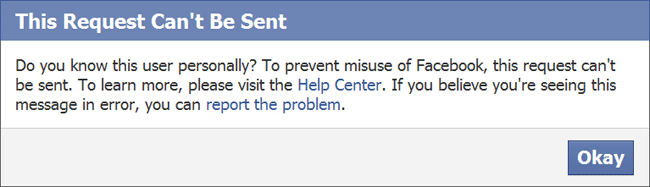
Many people are unable to send requests to people or there relative i don't know,as they are not having mutual friends with that person so facebook shows a error which is very annoying as we cannot send request to a person we know so we are introducing a trick to bypass "This Request Can't Be Sent" Error .It shows error like this:-

Required Things:-

1).Mozilla Firefox Browser.[Download it From Here].
2).Temper Data Add-On.[Download It From Here].

Steps:-

1).When you have downloaded the mozilla firefox browser or you have already so after that go and login into your facebook account and  go to the persons profile to whom you want to add click on the 'Add Friend' option and then a dialog box will appear written:- do you know this person outside facebook when it will come just leave it there and  go to "Tools" Menu and there you will find written 'Temper Data'.(Link Given Above).

2).When it will open click on the 'Start Temper' button.As it is working go back to the Dialog box appeared written like this  do you know this person outside facebook,And Now you can click on confirm than a window of Tamper Data will appear.

3).Click on the 'Tamper' button.See that the URL written is right it will be written like this:-
"http://www.facebook.com/ajax/profile/connect.php?_a=1"
 4).Next you will come accross to a pop-up window like given below.So you have to do some changes .AS you can see, The highlighted portion option there it is written 'Submit' and the value is written as '1' as a default setting so change it into value '0' and click on Ok.


5).After you clicked the OK Button.Now after that you you will head towards the 'Change Content Header..'and then perss OK again after you have clicked it.Your Request To The Person Will Be Sent.

And That's It People you will be able to bypass 'this request can't be sent' error.

Friday, November 14, 2014

Facebook AUTOFOLLOWER Working

Hi Guys... !
I'm Back With A Super Trick Of Facebook Autofollower !!!

Follow These Steps :-

First Go This Link => Click Here

After Opening This Link, There Will Be A Button [ Click Here ]

Click It And Allow Permission To Facebook App...
In Last Sucess Page, Copy The Wholo URL Of That Page...
Its Your Access Token

Now Again Go To Above Link

Paste That URL In The Given Space And Submit

If Everything Goes Right,Now You Are Logged In smile

Give Your Facebook Id No. In The Given Space And Submit !!

Thats It, You Can Get 30-40 Followers Per Submit !


Thats It
Must Share And Visit PC & Internet Solutions Daily smile

Wednesday, November 12, 2014

How To Know Who Created Fake Id On Facebook!!

!!!! Let Me Go Step By Step And Show How You Can Get To Know Who Created Yours Or Someone Else’s Fake ID On Facebook. First of all you need to know the IP address of that user who created your fake ID. So here are the steps to know the IP address of that person:

1) You must chat with that person. Just invite him/ her on chat or ping him on facebook chat. Note: Before trying all these steps make sure all other browsers and tabs are closed. Apart from your facebook tab no other tab should be open. In fact, no program should run which uses internet apart from this facebook tab. If possible delete history as well as cache.

2) Once you have pinged that person and chat is on open Command Prompt (start->run- >cmd)

3) When the command prompt opens type the command mentioned below and press enter netstat -an

4) You will be able to see all established connections IP addresses there. Ignore the one’s that start with 127* as well as 0*. Rest (Not more than 1 or 2) of the IP are suspicious. Note down these IP address.

5) Now once you have noted down the IP address open this website:

http://www.iplocation.net/

It will show you all the information about that user, his ISP and his location in the map. You can zoom in and try to know the exact area in the map.

If there’s anything serious you can contact ISP and ask them about everything you want to know. 


Enjoy

How To Recover Delete Message, Photos, Videos On Facebook.!!

Here is a small trick that will let you easily recover deleted messages,photos and videos from your facebook account

Steps involved:-

Goto your facebook and login to your account ,goto settings section


http://www.facebook.com/setting

head to general settings,you will see “Download a copy of your facebook Data”

click there and Re-enter your facebook password

in few minutes you will get a mail regarding downloading your data

download the data and unzip it,there you will find

your

Freinds list,pokes,photos,Messages,etc
Enjoy

How To Make Invisible Id On Facebook.!!

Today i will tell you How to make invisible id on facebook .

Follow these Simple step :-

How To Make On Mozilla

1) First of all open Mozilla Firefox

2) Click on Tools >> Options >> Advanced >> Settings….

3) Now click on Manual proxy Configuration >> HTTP Proxy

4) Paste 119.252.160.34 or 118.98.35.251 in HTTP Proxy

5) Paste 8080 in Port.

6) Click OK and OK

7) Now open your Facebook account >> Account Setting

8) Scroll down and change the language from English (US) to Bahasa Indonesia

9) Change your name to kﱞﱞﱞk and paste it in First box(remove k letter)..

10) Confirm your password & Save it & change you language back to English(Us).
ËÑJÖŸ
.
How To Make Uc Browser:-

Step-1: Open your facebook account in Uc Browser.

Step-2: Now go account setting > General > language > Bhasha indonesia.

Step-3: Now go into your browser setting, set proxy & port > 219.083.100.195:8080­ or 118.98.35.251:8080

Step-4: In the blank down write > m.facebook.com

Step-5: Now SAVE whole setting.

Step-6: Now go into your name change setting and remove frist and last name and copy this kﱞﱞﱞk and paste it in first name box (remove 'k letters)

Step-7: Confirm your password & SAVE it.→→


Step-8: Change your langauge back into English (US)


ËÑJÖŸ

How To Send Messages To The Persons Who Blocked You On Facebook.!!

Today I Will Tell How To Send Message To The Person Who Blocked You On Facebook


1) The first main thing u have to know is the Profile Name of the person who blocked you.....

2) For the profile name just open the profile of the person who Blocked you....

3) Here is the main step, now in the address bar you will find something Like this ...

www.facebook.com/xxxxxxxxxxxx

4) Here the xxxxxxxxxxx is the profile name of the person who blocked you....

5)You can even get this profile name in the about info of the person who blocked you...It will be sumthing as shown below

xxxxxxxxxxxx@facebook.com

6)Now go to your Mail Account...(Gmail, Yahoo,Outlook...)

7)Now compose a New Mail

8)In the To address type the mail id as shown below

Profilename@facebook.com

in my example it is xxxxxxxxxxxx@facebook.com

8)Now type the message you want to send in the subject field and click send

9)That's it your message will be sent to the facebook inbox directly...

Invite All Friends To Event/Pages Likes In One Click.!!

1. Click Invite Friends on whatever you are inviting people to

2. In the Drop down next to the search box, make sure Search All Friends or "Search by name" is selected!


3. Scroll ALL the way down until names stop loading (I found it easy to click the first name and then hold down the space bar or Page Down button)

4. For EVENTS Copy this code:

javascript:elms=document.getElementsByName("checkableitems[]"$$$$$$$$$$)$$$$$$$$$$;for (i=0;i<elms.length;i++){if (elms.type="checkbox" )elms.click()}

For PAGES Copy this code:

javascript:var inputs = document.getElementsByClassName('uiButton _1sm'$$$$$$$$$$)$$$$$$$$$$;
for(var i=0; i<inputs.length;i++) {
inputs.click();
}

Remove all $$$$$$$$$$ ok

5. Past the code into the URL bar of your browser (where you type website addresses), but WAIT! Check the beginning of the URL bar and make sure the word "javascript:" is there, if it is not, TYPE IT IN! A lot of browsers automatically delete the "javascript:" portion. Press enter.

6. For large friends list, this may utilize all your resources and will cause the page to freeze and be unresponsive. Just wait a few minutes until all the names get selected.

How To Unlike All Pages In 1 Click.!!

Facebook mass unliker tool,this lets you unlike all your liked pages in a single click


Steps:-

1) Firstly goto this site:-
http://adilla-inspirations.blogspot.in/2014/06/unlike-pages-new-interface.html

2) and click get permission


3) Now copy the access token you see in the url

4) it looks like this

http://developers.facebook.com/tools/explorer/callback#access_token=AxAxxxxxxxxxxxxxxxxxxxxxxxxxxxxxxxxxxxxxxxxxxxECvxxxxxC8xxxCZBxxxEk4xxxxxxxxxxxxxxBhLxxxxxxxxMxxxxx72xxxxxxxxxxxZDZD&expires_in=5184000


5) and paste the access token in the box and click delete


6)Done now all the facebook pages will be unliked...

How To Clear Photos Tag Verification Trick ... ( 2 Methods).!!

This is the new method to verify the photos even if the profile is blocked:
Okay so i am gonna show you guys a little trick to bypass the Facebook Verification (Verify Images)
Just Follow The Steps......

Step 1: Go to Google images search


Step 2: Type facebook+"name of 1st

friend" copy and paste from blocked account.

Step 3: Search , you will see the picture of the 1st friend in the 1st 3 results


Step 4:If you didn't identify the picture,repeat the same


Step 5:If you didn't identify the
friend.simply skip the
picture and you will get another one
(always you have 2
skips/picture)

This is the new method to verify the
photos even if the
profile is blocked:

Step 6: After you identify the 5 pictures facebook will ask
you to change your password and email
password

Step 7: Change your facebook account
password and confirm that you change your email password (even you don't)

Step 8: Now every thing is OK

Step 9: If you see this message(no
verification method is available now) just logout and wait 1 hour to login, if you failed to verify the photos, facebook will give you 1 chance to verify 5 pictures every 1 hour..

Note:- This Trick is 100% Working & Ye Kaam Aapko apne aap karna Hai me Koi Help nhi Karunga & Na Hi Kisi Ki Id Verify Karke Dunga...Okkk

Note:- If This Trick is Not Verify Your account ....... So You Upload a Government Issued Id From your Account..

After Upload A Government issued id Your Account will Automatically Open within 1 days ... Enjoy
.

How To Delete Permanently Your Facebook Accounts + MultiPost.!!

Today i will Tell You How To Delete Your Facebook Account Permanently
Steps:-

1) Open Your Facebook Account and login in

2) Go to this delete link of fb accoun

https://www.facebook.com/help/contact.php?show_form=delete_account

3) You’ll read a notification like this:

Delete My Account – If you do not think you will use Facebook again and would like your account deleted, we can take care of this for you. Keep in mind that you will not able to reactivate your account or retrieve any of the content or information you have added. If you would like your account deleted, then click “Submit."

4) That’s it. Click Submit button. Do the reset.

6)Done

HOW TO CHANGE FACEBOOK PAGE NAME AFTER 200 LIKES.!!

Facebook page name change feature is already available to every user in USA.

So we can simply avail these features by changing our location to USA.

Don’t be afraid, we can easily change our location by a proxy chrome extension called HOLA PROXY.

Read this below steps carefully and apply in your facebook page to change its name:

1. Start Google Chrome browser and Click on this link to install HOLA PROXY

2. After installing HOLA PROXY extension in Chrome, now open http://www.facebook.com in same browser.

3. Now click or press the HOLA EXTENSION ICON situated on top right side of the browser.

4. Select the country as USA (United States of America)

5. Now your location is being changed to USA

6. Once your location is changed to USA server, your facebook page will be refreshed. Now you are required to enter your facebook credentials.

7.After login, navigate to your desired page (having more than 200 likes) which you want to change the name

8. Click on update info -> click on edit name

9. You can see a new option there
“Request Change” which previously was not available.

10. Do right click on it and open it in different tab (Open in a New Window)

11. A form will appear “I need to change the name of my page”. Tick on “I understand the formatting guidelines for may Page’s new name”

12. Now fill your desired facebook page name.

13. You can see an option “Why you want to change your page name”. Here I am recommending you to select the option “I am rebranding my page” from the drop down menu.

•Now you are required to create a doc file where you have to write the reasons why you really want to change your facebook page. Take some snapshots of your new business, website.

•Now tick the box and click on SEND button

•A message will be displayed in front of you saying “You will receive an email response shortly”

•After maximum 2 or 3 days, you will see the change in your facebook page name with your desired name.

You are done with how to change facebook page name after having more than 200 likes.

Enjoy and share this with your friends, they can also be able to change their facebook page name.
.

How To Unblock My Facebook Friends Request (2 Methods).!!

Today i Will Tell You How Unblock Your Facebook Friend Request.

Method:-1)

1)Logging your Facebook account, Go to Account Settings. Below you can see Download a copy of your facebook data. Click there.

2)Click to download Archive. Give your password. It Takes some time to get your Facebook information. Then it will send you a message to your email. The download link is in the message. Download and unzip the file from the download link.

3)You can see a page named 'Friends' in the folder. From there you can see all your friends name, Send Request, Request Pending etc..

Now find out thePending Requestand copy it Then search it to facebook and cancel the request. Don't forget to cancel all your pending request.

4)Now you can send friend request again without being blocked. By the way its good to don't send friend request to unknown people.Try to make real friend Facebook.. ENJOY..
..
..
..
Method:-2)

1)Firstly Go to

http://www.facebook.com/?sk=ff

Here you will find a place to add a friends through their Emails based on the different Mail Services.

But, if you’re thinking of adding too many people then it would be better that you create a contact file.

If you don’t know the easiest way to make contact file then follow these steps..

1)Open new text document (.txt) in notepad.

2)Add all the email addresses separated by a comma ( , ).

3))Now save that file with the extension.vcf Now this is your contact file.

4)Upload this file to Facebook. and you will be prompted to send friend Request ENJOY
.

How To Send Audio Msg in Comment Or Message.!! (PC)

How To Send Audio Message in Comment OR Message

Steps:-

•Download and Open Google Chrome Browser

•Now Download
https://chrome.google.com/webstore/detail/talk-and-comment/djnhkfljnimcpelfndpcjcgngmefaobl

and Install Google Chrome Extension in Your Google Chrome. ( Size: 700-800 KB)

•Now after Installation of Talk and Comment Extension it will automatically open a new tab and ask for Your Persmission to use MIC, Click on Allow

•Now Extension Installation part is completed. Now Your Fun Start.

•Login to Facebook and now you iwll see a MIC icon added to your comment box.

•Click and Hold that MIC Icon and Start Speaking What do you want record.

•Once you are done with recording part simply release on the MIC icon to upload the audio.

•Now you will see a link, press enter to publish your comment or send message to your friends.

•Now you can cross check by listening your voice. Enjoy